Service · Microsoft 365
Microsoft 365, set up properly from day one
Many businesses switch Microsoft 365 on, start using email and Teams, and never set up the rest. I configure it the way your business works: where files live, who can see what, how it looks, and how it's protected.
It works for brand-new tenants and for businesses that have been on Microsoft 365 for years and want to tidy up without losing anything.
Sounds familiar?
Signs you need this
- —You use Outlook and Teams, but documents are still everywhere.
- —Sites were created as people needed them, and there's no clear structure.
- —You're not sure everyone has multi-factor authentication switched on.
- —Anyone can share files with anyone, and you don't know what's been shared.
- —The sign-in page and SharePoint still look like Microsoft's defaults, not your company.
What you get
What I set up for you
A planned site structure
One home site and a site per department, joined by a hub, with sensitive files kept in their own locked site.
Permissions by group
Named owner and member groups, sensible sharing settings, and at least two owners on every site.
Libraries with metadata
Columns and saved views for the ways people actually look for documents, instead of deep folder trees.
Your brand on everything
A branded sign-in page, your logo and colours on the Microsoft 365 top bar, and a SharePoint theme to match.
The security basics
Multi-factor authentication for everyone, safe default sharing links, and a small number of admin accounts.
A written record
Sites, owners, groups, columns and every setting changed, written down. On bigger projects the whole setup is scripted so it can be checked and rebuilt.
How it works
Four steps, no surprises
- 01
Discovery
A free call about your goals, your bottlenecks and your existing tenant.
- 02
Design
Site structure, permissions and page layouts agreed before anything is built.
- 03
Build
Delivered in days, inside your own Microsoft 365.
- 04
Launch & train
Rollout, short training for your site owners, and support after go-live.
Examples
Setups I've delivered
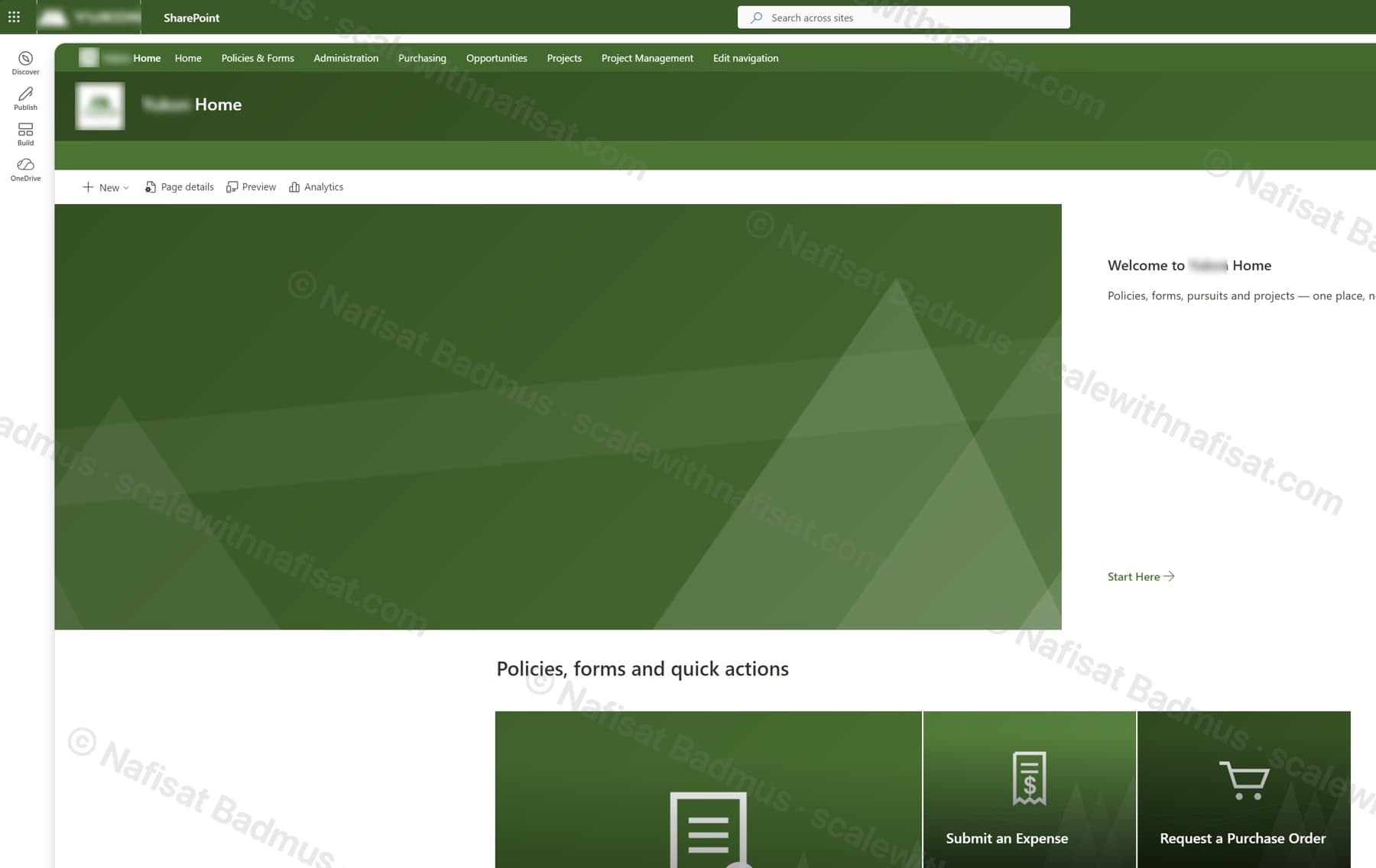
Business-Ready Microsoft 365 Intranet
An untouched Microsoft 365 tenant turned into a branded company intranet — seven sites on one hub, a locked-down records area, sales and project workspaces, all fully scripted.
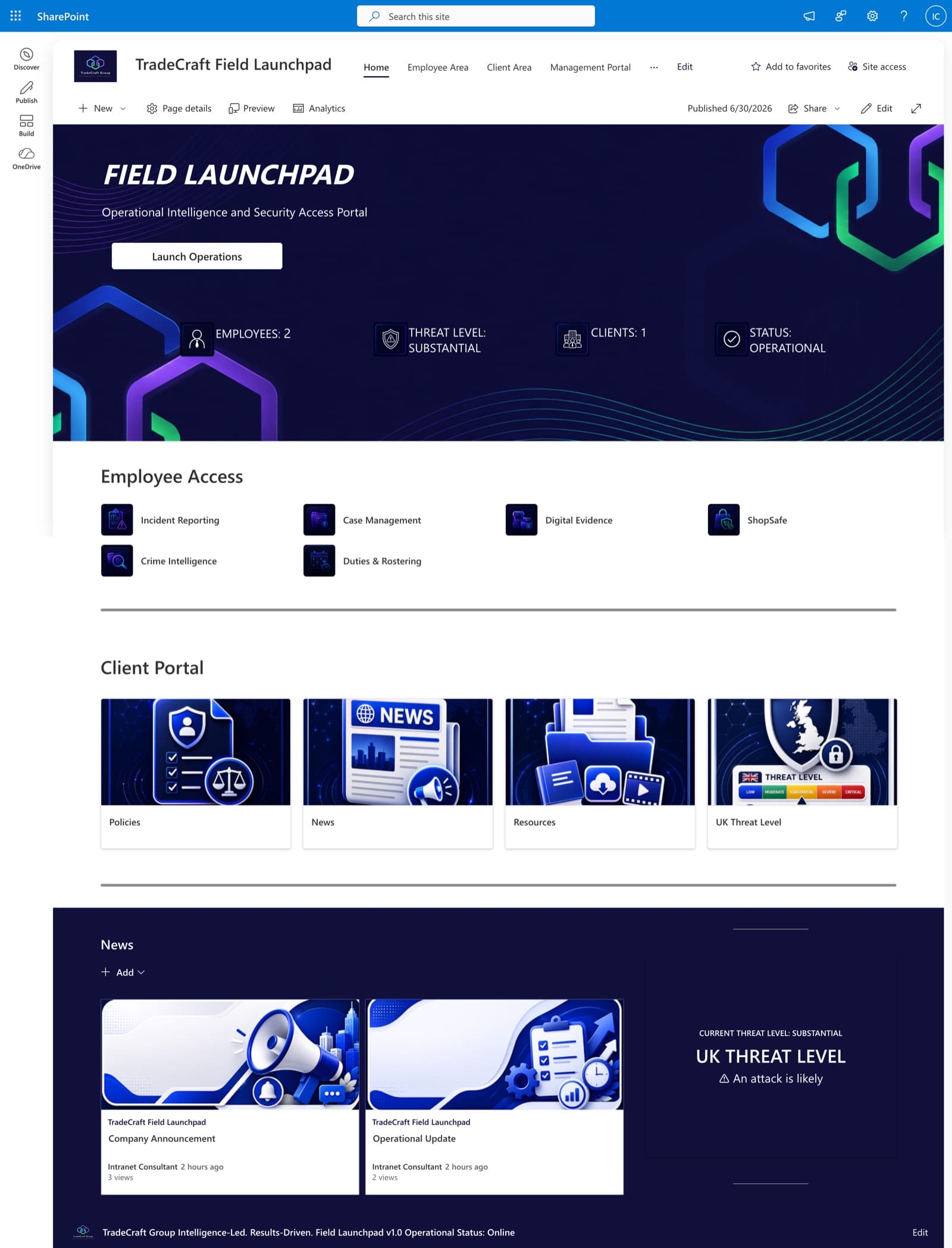
TradeCraft Field Launchpad
A secure operational intranet serving employees, management, and clients — role-based portals, live operational status, and centralized intelligence resources.
Questions
Common questions
We've used Microsoft 365 for years. Is it too late?+
No. For existing tenants I work in a safe order: secure sign-ins and sharing first, then map what you have, move sensitive files into a locked site, build the home site and hub, and tidy one department at a time so nobody's work stops. Nothing is deleted without your say.
Which Microsoft 365 plan do we need?+
SharePoint, Teams and OneDrive are included in Business Basic, Standard and Premium. Some branding and security options depend on your licence, and I'll point out anything that needs an upgrade before we start.
Do you set up email and migrate mailboxes?+
My focus is everything after email: SharePoint, Teams structure, permissions, branding and security settings. If you need a mailbox migration, I can advise on the approach.
Will we be able to manage it ourselves afterwards?+
Yes. You get a written record of the setup, short training for your site owners, and support after go-live.
Can you work with us remotely?+
Yes. I'm based in Ibadan, Nigeria and work remotely with businesses worldwide. We meet on video calls and I build directly inside your Microsoft 365.
Free download · PDF
The Microsoft 365 Setup Checklist
9 steps to set up SharePoint, permissions and security properly, as a printable tick-box list. Starting fresh or tidying up years of “we'll sort it later”.
Further reading
- Clients Can't Open Your SharePoint Links? What's Changing This Month and How to Fix ItMicrosoft is retiring the one-time codes that let outsiders open SharePoint and OneDrive files. Clients, accountants and contractors without a guest account will start seeing “access denied”. Here's who's affected and the five-minute fix.
- You're Paying for Microsoft 365. Here's What Setting It Up Properly Actually Looks LikeMost businesses use Outlook and Teams and leave the rest of Microsoft 365 untouched. A practical, nine-step checklist for setting it up properly — whether you're starting fresh or have been on it for years.
- 5 Signs Your Business Has Outgrown Shared Drives (and What to Do About It)Emailing files around, chasing approvals, retyping the same data? Five signs your business has outgrown shared drives and spreadsheets — and how Microsoft 365 fixes each one, fast.
Ready to get Microsoft 365 working for you?
Book a free call. We'll look at what you have and what you need.
Book a free call